Now every course has a place to talk.
Some of the most useful information about a golf course does not come from a scorecard or yardage book. It comes from the golfers who play it.
The local who knows where not to miss on No. 7. The golfer who can tell you whether the greens were aerated last week. The group looking for one more player on Saturday morning.
Golf has always been built around those connections. Community has also been a core part of 18Birdies from the beginning, from sharing rounds and following friends to competing in leagues and tournaments.
When we introduced Home Courses, we gave golfers a way to identify the courses they play most, find other local players, and stay closer to the communities around those courses.
Now, we are bringing real conversation directly to every course on 18Birdies.
Where to find Course Forums
Open 18Birdies, find a course, and visit the Community section of its Course Profile. You can also access Course Forums from the Play tab or through the Course Forum tool during a round.
- Community section of any Course Profile
- Course Forum entry point on the Play tab
- Course Forum tool from the GPS screen during a round
Meet Course Forums
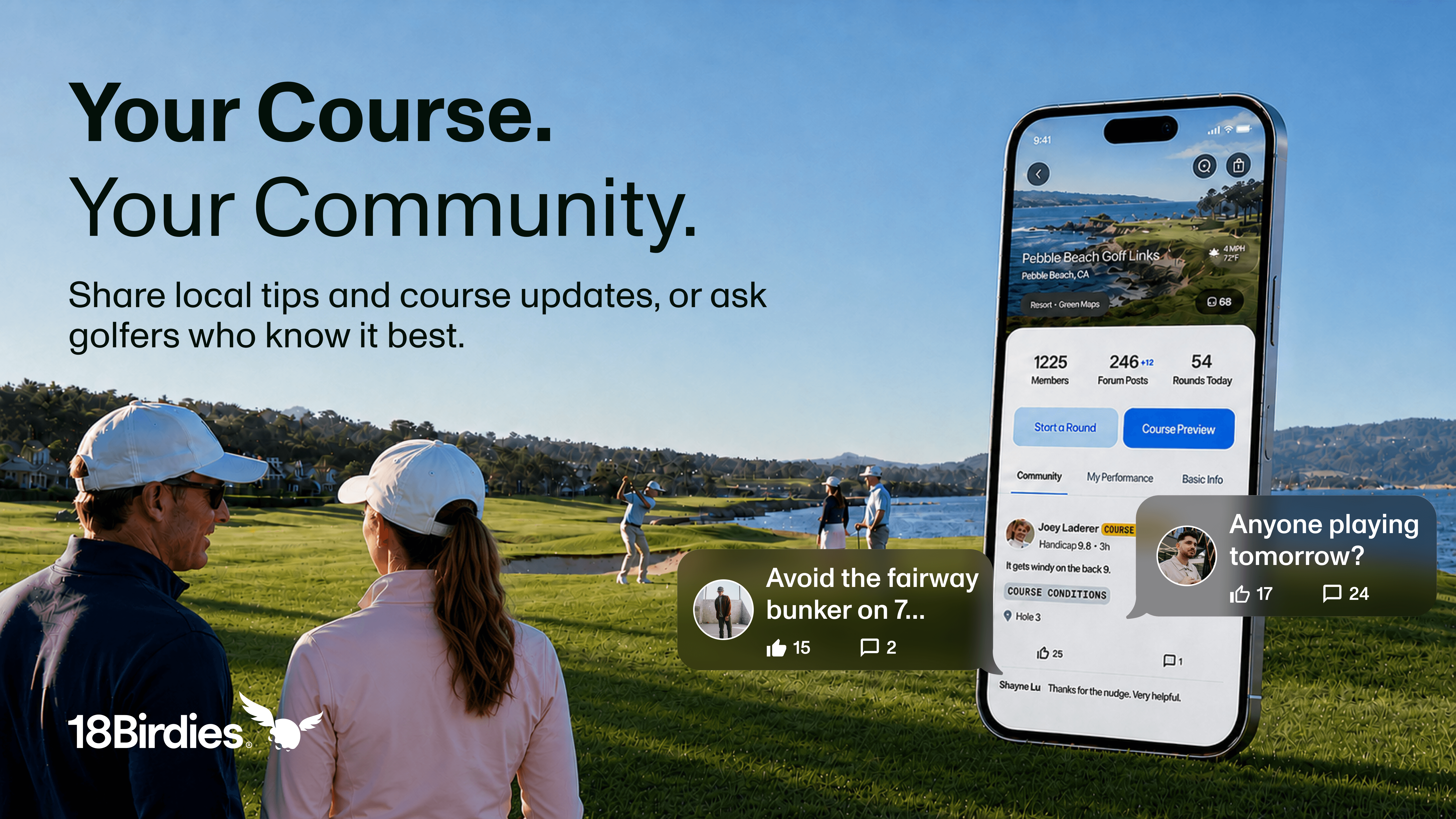
Every Course Profile now includes a dedicated Course Forum where golfers can share local knowledge, ask questions, and connect with others who play the same course.
Heading somewhere for the first time? Ask for advice before your round. Just walked off the 18th green? Let other golfers know how the course is playing. Looking to fill an open spot in your group? Find players who already know the course.
Every course has its own community. Now that community has a place to connect on 18Birdies.
What Can You Post?
Course Forums are designed for the conversations golfers already have before, during, and after a round.
Share Course Conditions
Let other golfers know what they can expect before they tee it up.
- “Greens were aerated earlier this week.”
- “The course is cart-path-only after last night’s rain.”
- “Greens are running fast today.”

Talk Strategy and Share Local Tips
Help golfers approach the course with a better plan.
- “Avoid the fairway bunker on No. 7.”
- “The approach on 12 plays longer than it looks.”
- “Where’s the best place to miss on this green?”

Find Playing Partners
Coordinate a round, fill an opening, or meet golfers who already know the course.
- “Anyone playing tomorrow morning?”
- “Looking for a fourth for Saturday at 8:20.”
- “First time here. Anyone want to join?”

Ask Questions and Share the Moment
Not every post needs to be a course report. Ask, share, celebrate, or start a conversation.
- Post a photo from a favorite tee box.
- Ask for recommendations before a first round.
- Share a great hole, pin placement, or course view.
You can also tag a specific hole so golfers can easily find relevant advice. Add photos to show course conditions, tee-box views, pin placements, or anything else worth sharing.
Earn Recognition in Your Course Community
Course Forums are built around firsthand knowledge. If you play a course often or contribute helpful updates, other golfers should be able to see that context.
Member
When you add a course as one of your Home Courses, a Member badge appears next to your name when you post in that course’s forum. You can select up to five Home Courses in 18Birdies.
Course Expert
Home Course members can earn a Course Expert badge by creating at least three original posts for that course within a rolling 30-day period.
The Course Expert badge recognizes golfers who actively contribute updates, advice, and local knowledge to their course community. Earn it, and every post you make comes with a little extra credibility, because others will know you truly know the course.
Add Your Local Knowledge.
Whether you have played a course hundreds of times or are preparing for your first round there, Course Forums give you a direct connection to the golfers who know it.
Your course. Your community. Add something to the conversation.
Course Forum FAQs
What is the Course Forum?
The Course Forum is a public, course-specific community inside 18Birdies. Golfers can use it to share current course conditions, discuss strategy, ask questions, find playing partners, and connect with others who play the same course.
Who can post in a Course Forum?
Any 18Birdies user can view and post in Course Forums. You do not need to select a course as a Home Course before participating.
Who can see my posts?
Course Forum posts are public. Any 18Birdies user who visits that Course Profile or opens its forum through the Play or GPS experience can see your posts, photos, and comments.
What can I post in a Course Forum?
You can post course conditions, local tips, strategy questions, playing-partner requests, photos, and general course conversations.
Where can I find a Course Forum?
You can access Course Forums from the Community section of any Course Profile, the Course Forum tool on the GPS screen, or the Course Forum entry point on the Play tab.
Can I post about a specific hole?
Yes. When creating a post, you can tag a specific hole. Other golfers can then filter the forum by hole number to find relevant tips and conversations.
Can I add photos?
Yes. You can attach photos to posts and comments to show current conditions, pin placements, course views, or other helpful information.
What is the difference between the Member and Course Expert badges?
The Member badge appears when you post in the forum for a course you have selected as a Home Course. The Course Expert badge is earned by Home Course members who create at least three original posts for that course within a rolling 30-day period.
How will I know if someone responds?
You will receive an in-app notification when another golfer likes, comments on, or replies to your Course Forum post.
How do I report a post or comment?
Tap the three-dot menu in the upper-right corner of the post or comment, then select Report & Block. This flags the content for review and hides that golfer’s content from you.