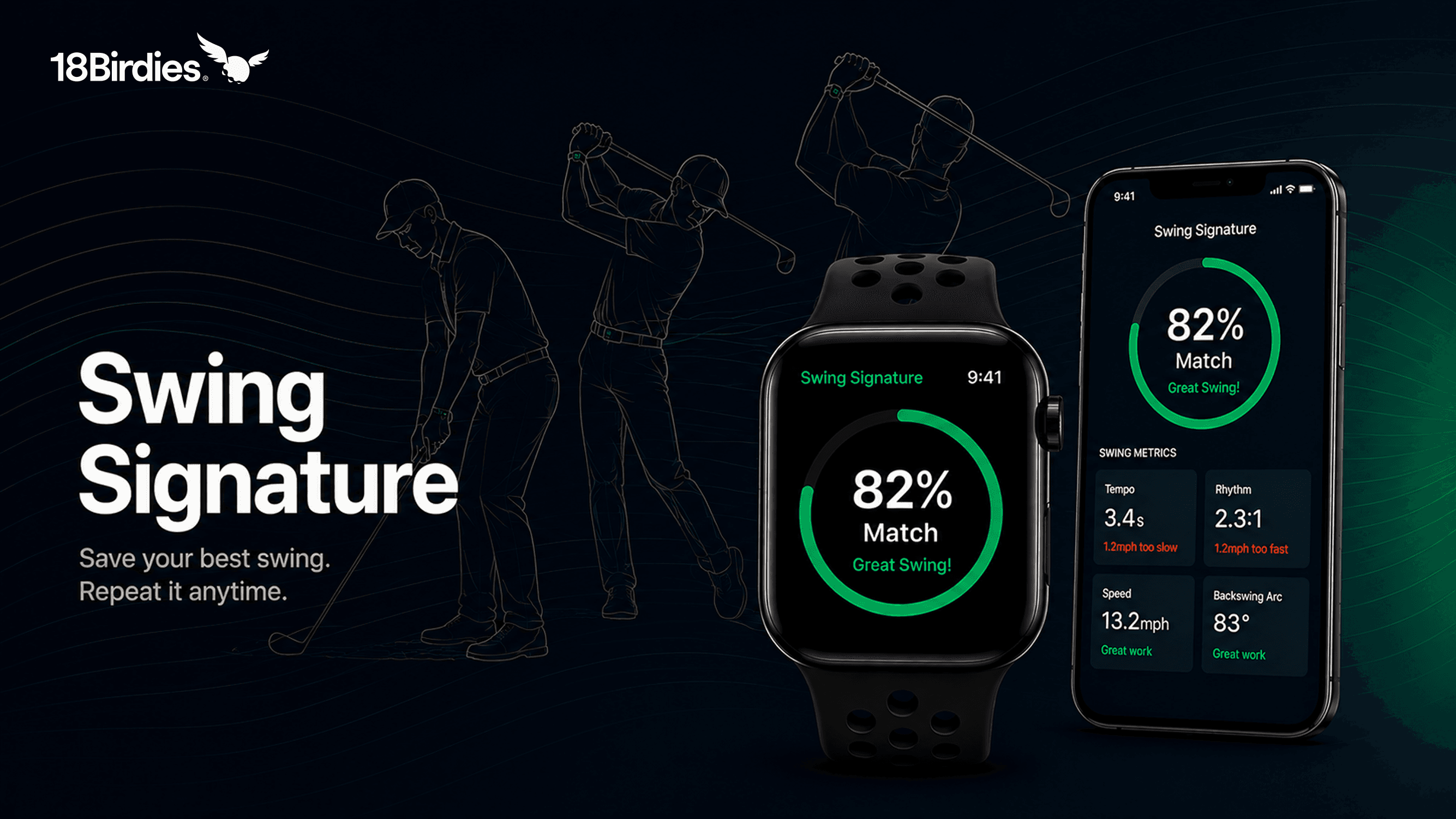
Every golfer has felt it. That one swing on the range where the strike feels effortless and the ball does exactly what you pictured. Swing Signature on 18Birdies lets you save the data behind that swing using your Apple Watch, then measure every future swing against it. No coach. No launch monitor. Just your watch and the motion you trust most.
There's nothing quite like going to the range after a long day and finally hitting a ball exactly the way you pictured it in your head. The strike feels effortless, the ball launches on the perfect line, and for a brief moment the game feels easy. Every golfer knows that feeling, and every golfer immediately wants to recreate it. Then you step up to the very next ball.
You try to remember exactly what you did on the previous swing. Maybe your tempo felt smoother. Maybe your transition slowed down. Maybe you shortened your backswing or stayed more connected through impact. Suddenly you're juggling five different swing thoughts trying to recreate something that happened naturally just one swing ago. The very next ball, you top one twenty yards. Frustrated, you start swinging harder, and somehow leave the range hitting the ball worse than when you arrived. The feeling of that perfect swing slowly disappears, and you're left trying to chase something you can't quite describe.
We've always believed there should be a better way to hold onto the swings that feel right instead of trying to rediscover them over and over again. That idea is what led to Swing Signature.
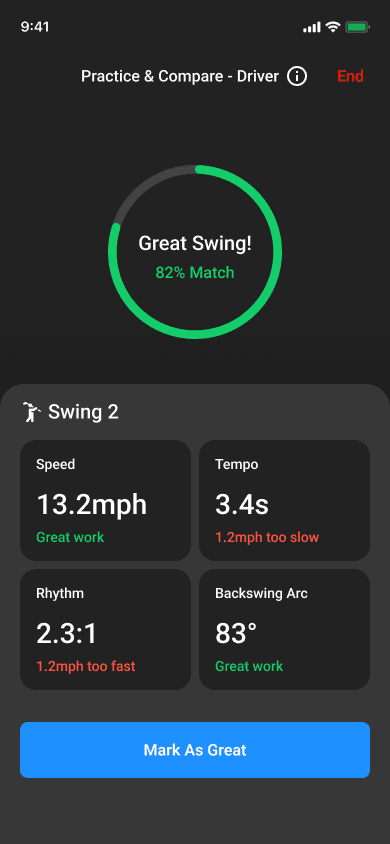
Swing Signature is a feature on 18Birdies that uses Apple Watch motion sensors to capture your best swing across four measurements: tempo, rhythm, speed, and backswing arc. Once saved, every future swing is compared against your signature in real time so you can see exactly what changed and what to adjust on the next swing. Currently available to iOS users only.
How Swing Signature Works
All you need is your Apple Watch and a few swings you trust. When one feels right, mark it on your watch. Do that three times and you have your Swing Signature.
- Open Swing Signature inside your 18Birdies profile.
- Choose whether you want to create a Driver or Iron Swing Signature.
- Put on your Apple Watch and start swinging.
- Mark three swings that feel like your "best" swing.
- Compare against it anytime.
You can build one Swing Signature for your driver and another for your irons, since those two swings have different tempos, speeds, and arcs by nature. The experience is designed to feel lightweight and seamless. You put on your watch, swing naturally, and compare against the motion you trust most.
Understanding Your Swing Signature
Your Swing Signature is built using four core swing measurements captured directly from your Apple Watch.
What is "Tempo"?
Tempo measures the total time between the start of your swing and impact with the ball.
Why it mattersMaintaining a consistent tempo helps with balance, timing, and control throughout your swing. Even small tempo changes can alter contact and ball flight.
What is "Rhythm"?
Rhythm measures the relationship between your backswing and downswing timing.
Why it mattersConsistent rhythm promotes smoother sequencing and helps you avoid rushed transitions or over-accelerating from the top.
What is "Swing Speed"?
Speed measures the maximum speed your hands reach during the swing.
Why it mattersHigher speed can create more distance and power, but maintaining control of that speed is what leads to repeatable golf shots.
What is "Backswing Arc"?
Backswing Arc measures how far your wrist travels around your body during the backswing.
Why it mattersA longer backswing can generate more speed, but it can also make timing and consistency harder to repeat. Finding your ideal range helps build a more reliable swing.
Practice and Compare
Once your Swing Signature is saved, you have something tangible to chase.
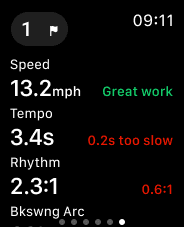
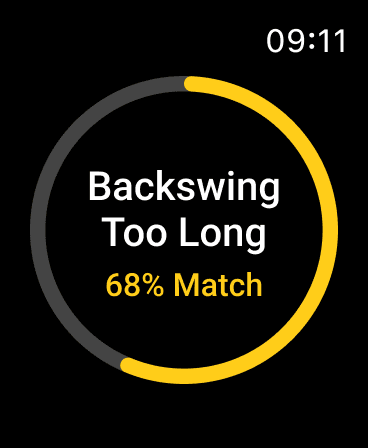
For every swing, 18Birdies compares your motion against your saved signature directly from your Apple Watch. You'll see how close you are to your best swing and get one focused swing thought to work on for the next one. No long data dumps to interpret. Just a clear read on where you are and what to adjust.
The most useful moments tend to happen before the ball ever moves.
Dial in your practice swing
Take a real practice swing before you step in, see how it measures against your Swing Signature, and step up to the ball already knowing you have the right feel. It turns the practice swing from a guess into a checkpoint.
Make sense of the shot you just hit
When a shot doesn't come off the way you wanted, you can check what your swing actually did before the next one. Maybe your tempo got a little quick. Maybe your backswing ran long. Instead of carrying the mystery of a bad shot into the next, you get one small adjustment to focus on and move forward with a clear head.
Want feedback during a round?
Swing Signature works during rounds too. It's fully optional and opt-in, so you only turn it on if you want it. With haptic feedback on your Apple Watch, 18Birdies gives you a quick buzz when your swing drifts from your saved signature, helping you stay aware of your tempo and rhythm without breaking focus on the shot in front of you.
Over time, these small reads add up. Good swings stop feeling random, and the gap between your best swings and the rest starts to close. What you start to realize is that the best swing you're chasing has been yours all along.
Build a Swing You Can Trust
Golf has always been personal. Some players swing fast, some swing smooth, and some have motions that look unconventional but produce incredible results. That individuality is part of what makes the game so compelling.
The goal is not to swing like somebody else. The goal is to build a swing that is repeatable for you.
That's where Swing Signature becomes useful beyond the range. Use it before a round to make sure your tempo feels good during warmups. Use it during practice to stop overthinking mechanical changes and instead focus on repeating your best movement patterns. Over time, it gives you a way to connect feel with something measurable, helping turn good swings from random moments into something more repeatable.
Every golfer has a swing they wish they could come back to. Swing Signature is built to help you find it again.
Turn Feel Into Something Repeatable
Save your best swing, compare every future swing against it, and keep building the consistency you've been chasing.
Find Your SignatureFrequently Asked Questions
Do I need an Apple Watch to use Swing Signature?
Can I use Swing Signature during a round of golf?
Yes. Swing Signature can be used during a round to help you stay connected to the swing you've saved as your baseline. Many golfers use it to keep an eye on their tempo, rhythm, and timing throughout the day, especially as fatigue or pressure starts to creep in.
For golfers who want additional feedback, Swing Signature can provide subtle buzzes during a round to help ensure you're staying connected to the swing you trust most. When enabled, your Apple Watch will provide haptic feedback if your swing begins drifting away from your saved signature. Haptic feedback is completely optional and can be turned on or off at any time.